Microsoft offers a broad stack of technologies, from ready-to-use Copilots to fully custom Azure infrastructure. Each option offers a different balance of speed, control, customisation, cost and technical ownership.
But what Microsoft AI solution should you choose? Choose the wrong one, and you end up with too much complexity, exploded budgets and time-wasting efforts.
This article explains how to confidently choose the right AI approach in Azure.
Author
Niels KroezeCloud Content Specialist
Reading time 10 minutesPublished: 27 August 2026
Start with build, adapt or extend
From an engineering perspective, the decision starts with three questions:
Should you buy or use an existing AI solution?
Should you adapt a managed platform to your use case?
Should you build and manage the solution yourself?
These questions affect far more than the development process. They also influence:
Time to value
Customisation
Governance
Security
Data access
Scalability
Required skills
Ongoing cost
Operational ownership
The right answer depends on what the AI solution needs to do.
A customer service assistant based on existing company information may work well with a low-code platform.
A fraud detection system that requires custom models and strict evaluations may need a managed Azure AI platform.
A product safety solution handling regulated data may require greater infrastructure control.
Don’t default to the most complex option. Always match the technology to the use case.
Choosing between Microsoft AI technologies
Microsoft offers four adoption models that trade customisation for simplicity under a shared responsibility approach:
Ready-to-use Copilots
Low-code development (SaaS)
Managed development (PaaS)
Azure infrastructure (IaaS)
Each approach requires a different level of technical skill and returns a different degree of control, as well as (shared) responsibility.
As you move from ready-to-use Copilots towards Azure infrastructure, you gain more control but lose speed. You also take on more development, maintenance and operational responsibility.
AI approach
Best suited to
Main benefit
Main trade-off
Ready-to-use Copilots
Standard productivity and role-based use cases
Fastest time to value
Limited customisation
Low-code SaaS development
Custom assistants and workflows with limited engineering
Fast development with more flexibility
Complex scenarios may exceed platform limits
Managed PaaS development
Custom agents, RAG* applications and model-based solutions
Strong balance of control and managed services
Requires engineering skills
AI on Azure infrastructure (IaaS)
Custom models, runtimes and regulated environments
Maximum technical control
Highest operational responsibility
*RAG:
Retrieval-Augmented Generation (RAG) combines a foundation model with enterprise data retrieval. Instead of retraining a model, relevant information is retrieved from trusted sources and supplied as context during inference. This improves accuracy, reduces hallucinations, and allows responses to reflect current business information.
The decision is not simply SaaS versus custom development. It is about choosing the approach that best fits your technical and business requirements.
1. Ready-to-use Copilots (SaaS Agents)
Microsoft Copilots are ready-to-use SaaS solutions designed to improve productivity with limited setup. Microsoft 365 Copilot adds AI capabilities across familiar Microsoft applications. Other in-product and role-based Copilots support specific business functions and industries.
This includes Microsoft 365 Copilot, role-based Copilots and Copilots built into products such as Dynamics 365, Power BI and GitHub.
Choose a ready-to-use Copilot when:
The use case is already supported by an existing product
You need a fast implementation
Standard functionality is sufficient
Your organisation has limited AI development capacity
You don’t want to manage infrastructure
A licence-based cost model is suitable
The main advantage is speed. Teams can start using AI without building models, APIs or hosting environments.
Trade-off: Copilots deliver the fastest results but offer less flexibility and control than a custom AI solution.
2. Low-code SaaS AI development
Low-code AI development platforms sit between ready-to-use products and fully custom development. Microsoft Copilot Studio allows teams to create agents using natural language and visual tools. These agents can use company data, connect to workflows and support specific business processes.
Choose low-code SaaS development when:
The use case needs more than a ready-to-use Copilot
You want to build quickly
Business teams need to contribute to development
The solution uses existing data and standard integrations
Your engineering capacity is limited
Youdon’t need full control over the underlying model or infrastructure
Copilot Studio can support rapid development with minimal setup and then add professional development capabilities later. This may include Microsoft 365 Agents SDK, Visual StudioCode or additional Azure services.
For example, a customer service shopping assistant that uses existing company data and pre-trained models may be a good fit for Copilot Studio. The organisation can launch quickly without building the full application platform itself.
Note:
Copilot Studio can also extend into more advanced development scenarios, so the boundary between low-code SaaS and managed PaaS is not always fixed.
Tradeoff: Low-code SaaS development opens AI development to more teams, but complex customisation may require a different approach. It also still has limits. As requirements become more technical, regulated or specialised, you may need to move towards a managed Azure platform.
3. Managed PaaS development
Platform as a service (PaaS) is often the starting point for custom AI applications and agents. Choose managed PaaS development when low-code tools don’t offer enough control, but you still want Microsoft to manage the underlying platform.
Microsoft Foundry provides a managed environment for building agents, RAG applications and model-based solutions. Developers can use APIs, SDKs and platform tools without managing the full infrastructure stack. Other managed services may include Azure Machine Learning and Microsoft Fabric for machine learning and data workflows.
Choose PaaS when:
You need custom agents or applications
The solution uses private or specialised data
You need control over model selection
you want to use RAG
Evaluation and observability are important
You may need fine-tuning, enterprise networking, policies and access controls
You don’t want to manage servers or clusters directly
A managed platform gives development teams more control over models, data orchestration and application logic. It brings agents, models and tools into one managed environment, with built-in monitoring, evaluations, access controls and policies.
For example, a fraud detection agent may require more control than Copilot Studio can provide. The team may need to select specific models, evaluate accuracy, manage sensitive data and adjust the application based on risk.
Trade-off: While managed PaaS offers greater flexibility and control than low-code SaaS, it requires stronger engineering and Azure expertise.
4) AI on Azure infrastructure (IaaS)
Infrastructure as a service (IaaS) provides the highest level of control over your models and runtimes. Depending on your requirements, you can use Azure Container Apps (ACA), Azure Kubernetes Service (AKS), virtual machines or a combination of these services.
It typically takes the longest to build and requires the most effort to maintain over time.
Opt for IaaS when:
You need to host your own model, or managed platforms cannot meet your requirements
You have strict regulatory or privacy requirements
Latency must be controlled closely or you need a custom runtime
The architecture requires specialised infrastructure
You need detailed control over networking, security or scaling
For example, a product safety and compliance system may need detailed control over data handling, access, model hosting and auditability. IaaS gives you that fine-grained control.
Trade-off: Azure infrastructure offers the most control, but it requires the most time, skill and ongoing operational effort.
Azure AI decision framework
AI approach
Choose this approach when:
Ready-to-use Copilot
Your use case is standard
Speed is the main priority
Limited customisation is acceptable
You do not need to manage the model
Licence-based pricing suits your requirements
Low-code SaaS development
You need a custom assistant or workflow
Business teams need to contribute
Existing connectors meet most requirements
Fast development is important
Full control over the model is not required
Managed PaaS development
You need a custom application or agent
The solution uses RAG or specialised company data
Model selection and evaluation matter
You need APIs, SDKs and professional development tools
You want Microsoft to manage the underlying platform
Azure infrastructure
You need to host a custom model
You have strict regulatory or privacy requirements
You need detailed control over networking and runtimes
Managed services cannot meet your performance or compliance requirements
Your team has the expertise to operate the infrastructure
Some solutions may also move between approaches over time. For example, a sales and inventory agent could begin as a low-code solution, then move to PaaS when the organisation needs more control over data analysis, models or integrations.
Also, the architecture does not have to remain fixed forever.
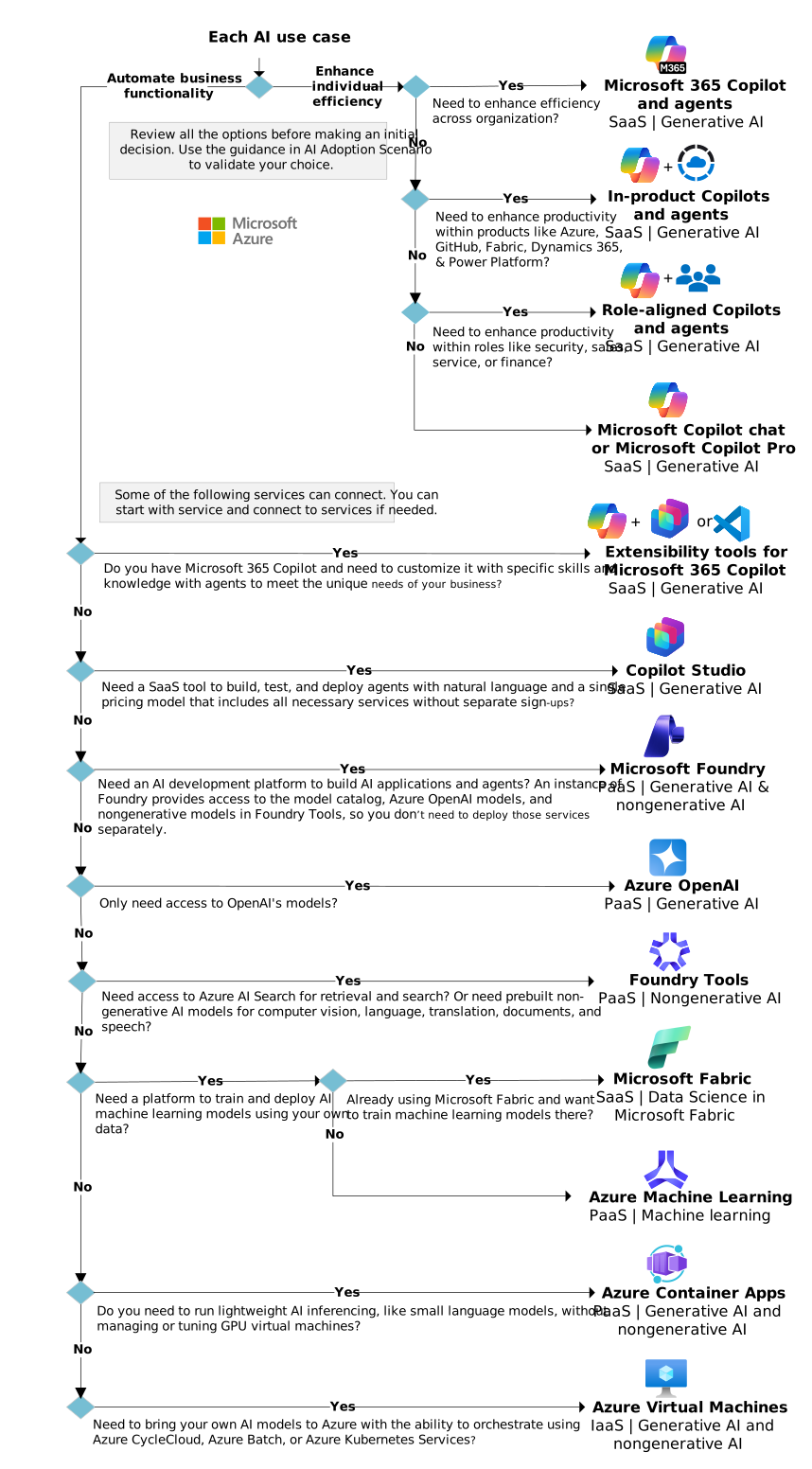
Microsoft AI decision tree
Use the decision tree in the following section to narrow between the options of selecting the right AI solution in Azure:
Intercept guides you from use case to proof of concept, implements the right AI services, and sets up the perfect AI infrastructure. This way, your team can focus on your product and stay ahead of the competition.
Use the following guidance to weigh four factors for AI solution:
Capabilities: Review the capabilities of Microsoft and Azure AI solutions to see if they meet the needs of your use case.
Data needed: Confirm the required data exists and is accessible for the scenario.
Skills required: Validate that each use case is achievable with current capabilities before you select a solution.
Cost: Assess whether the solution fits your budget
1. Capabilities
Start with what the solution needs to do. Review the capabilities of Microsoft and Azure AI services and compare them with your use case.
Ask yourself:
Does an existing Copilot already support this scenario?
Can Copilot Studio handle the workflow?
Do we need custom models or RAG?
Do we need to fine-tune a model?
Are standard integrations sufficient?
Do we need custom tools or APIs?
Do we need full control over the infrastructure?
Avoid choosing a platform based on popularity alone. Start with the business and technical requirements.
Note: Consider whether AI is really needed for the job.
Sometimes, alternative technologies, such as automation, analytics, or other logic can prove to be a more efficient solution.
2. Data
AI depends on accessible, relevant and usable data. Your data strategy determines whether your priority use cases have governed, high-quality data to work with.
Confirm which data is needed, where it is stored, whether it can be accessed, whether it is sensitive and which retention and compliance requirements apply. Also determine whether the data requires retrieval, indexing or transformation.
A simple productivity use case may work with data already available through Microsoft 365.
A custom RAG application may require document ingestion, chunking, indexing, embeddings and access controls.
A regulated system may require custom storage, networking and infrastructure.
The data requirements can quickly narrow your technology choices.
3. Skills
Validate that the solution is achievable with your current capabilities. Low-code tools may suit business users and developers working together. Managed PaaS development requires software engineering, Azure and AI application skills.
Infrastructure-based AI may also require platform engineers, data engineers, security specialists and machine learning expertise.
Ask yourself:
Can our current team build this?
Can we operate it after launch?
Do we understand the security requirements?
Can we monitor and troubleshoot the solution?
Do we need training, additional expertise or external support?
Choosing a highly customised approach without the required skills increases costs and delays delivery.
4. Cost
Consider both the initial and ongoing costs, including licences, model consumption, tokens, compute, storage, data retrieval, integration, monitoring, security, testing and training.
SaaS options often provide more predictable costs and require less operational effort.
PaaS costs may depend on model, token, storage and compute consumption.
Infrastructure provides greater technical control, but your organisation is responsible for operating the environment.
The lowest licence price does not always result in the lowest total cost. Include development and operational ownership in your comparison.
Closing thoughts
Choosing the right AI approach in Azure starts with the use case.
Ready-to-use Copilots offer speed
Low-code platforms add flexibility
Managed PaaS services provide more control
Azure infrastructure supports the most demanding custom or regulated scenarios
The right choice depends on your business and technical requirements, including data, skills, security, cost and operational ownership.
Remember, choosing the technology is only one part of AI adoption. You also need to prepare the organisation, validate the approach through a focused proof of concept (POC), and confirm that your team can support the solution responsibly.