Blog Data & AI

Why Move from Azure DevOps to GitHub Enterprise?

For many organisations, Azure DevOps has been a reliable home for source control, build pipelines, work item tracking, and artifact management. It served its purpose well, but the landscape of software development has shifted dramatically.

GitHub Enterprise has emerged as a complete developer experience platform that combines collaboration, automation, security, and AI-assisted development in a way that Azure DevOps simply cannot match.

This article makes the case for migrating from Azure DevOps to GitHub Enterprise, covering high-level benefits, strategic advantages, and what the transition means for development teams of all sizes.

Gregor Suttie

Author

Gregor Suttie Azure Architect & MVP

Reading time 6 minutes Published: 16 July 2026

GitHub Enterprise: Unified Platform Built around Developers

GitHub Enterprise is an enterprise-grade developer platform. It is available as a cloud-hosted service through GitHub Enterprise Cloud or as a self-hosted platform through GitHub Enterprise Server.

While GitHub Enterprise provides all the core version control and collaboration features of standard GitHub, it also adds advanced security, compliance, fine-grained access controls, and AI-powered coding assistance (such as GitHub Copilot).

GitHub Enterprise brings everything together in a single, cohesive experience:

  • Repositories: World-class Git hosting with code review, branch protection, and merge policies
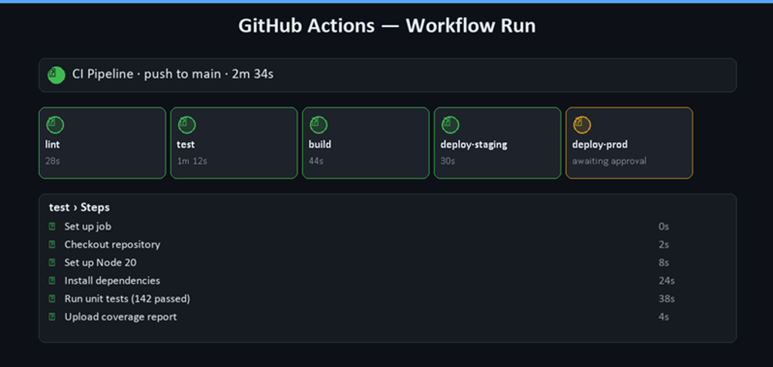
  • GitHub Actions: A modern, YAML-based CI/CD platform with a massive marketplace of pre-built actions. It helps simplify code reviews, testing, and deployment, reducing manual tasks, shortening approval times, and accelerating development.
  • GitHub Advanced Security: built-in code scanning, secret scanning, and dependency review
  • GitHub Copilot: AI-powered coding assistance directly in the development workflow
    With GitHub Copilot, development cycles can be accelerated through multi-file code generation, intelligent refactoring, and automated test creation.
  • GitHub Projects: lightweight, flexible planning connected directly to issues, pull requests and code 


Why move from Azure DevOps to GitHub Enterprise?

One of the most compelling reasons to move to GitHub Enterprise is the platform's philosophy. GitHub was built from the ground up as a developer-centric environment. Every feature, workflow, and integration has been designed with the developer experience at its core.

Azure DevOps, by contrast, evolved from Team Foundation Server (TFS) - a tool that was originally built around project management and process governance. Whilst Microsoft has done significant work to modernise Azure DevOps, the legacy of its origins is still visible in the UI, the configuration model, and the way teams interact with it day-to-day.


GitHub: The Network Effect of the Largest Developer Community

GitHub is home to over 180 million developers and hosts more open-source projects than any other platform on the planet. When your organisation moves to GitHub Enterprise, you gain access to the GitHub Enterprise network.

This matters in practical terms. Engineers can:

  • Contribute to open-source projects without leaving the same platform they use for work.
  • Discover and fork community-maintained Actions to use in their pipelines.
  • Engage with the wider community around libraries and frameworks they depend on.
  • Attract talent who are already familiar and comfortable with GitHub.


Repository Management: A Step Forward

GitHub's approach to repository management is more intuitive and feature-rich than Azure DevOps Repos. Some notable advantages include:

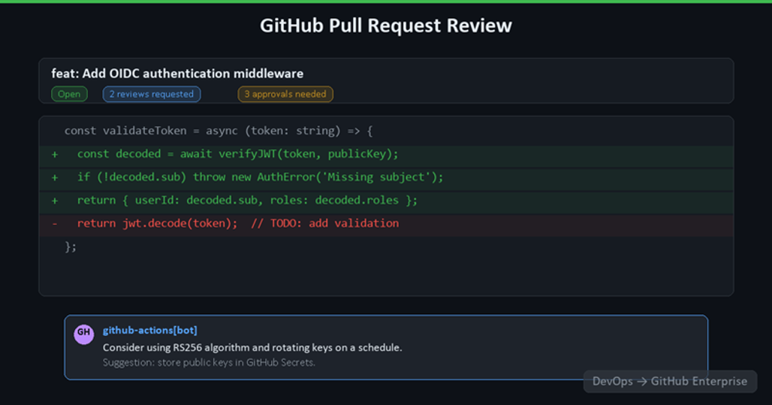
  • Pull Requests and Code Review: GitHub pull requests are the gold standard for code review. Features such as suggested changes, code owners, required reviews, and inline comments are mature and well understood across the industry. Azure DevOps pull requests work, but the experience is less polished and less widely adopted.
  • Branch Protection Rules: GitHub's branch protection model is highly configurable. You can require status checks, enforce linear history, restrict who can push to protected branches, and require signed commits, all from a simple UI or via code using the GitHub API.
  • Repository Templates and Standardisation: GitHub repository templates allow teams to bootstrap new projects with a consistent structure, including default workflows, code owners files, issue templates, and contributing guides. This makes standardisation across an engineering organisation much easier.
  • Innersource and Discoverability: GitHub Enterprise supports internal repositories that are visible to all members of the organisation without being public. This encourages an innersource culture where teams can discover and reuse each other's code, just as they would with open source.


CI/CD with GitHub Actions: Modern by Design

GitHub Actions is one of the most significant reasons to move. It is a fully cloud-native, event-driven automation platform that goes well beyond build and deployment pipelines.

Where Azure Pipelines uses a YAML format that can feel verbose and complex, GitHub Actions is structured around simple, composable jobs and steps. The marketplace contains tens of thousands of pre-built actions for everything from deploying to Azure, AWS, or GCP, to sending Slack notifications, publishing npm packages, or running security scans.

Actions can be triggered by virtually any event in the GitHub ecosystem, a push, a pull request, a release, a schedule, a workflow dispatch for manual runs, or even a comment on an issue. This event-driven model makes it easy to build sophisticated automation without the overhead of managing pipeline infrastructure.

For teams already on Azure:

GitHub Actions has first-class support for deploying to Azure services, with official Microsoft-maintained actions for Azure App Service, Azure Container Apps, Azure Kubernetes Service, and more.

Security as a First-Class Citizen

Security is no longer an afterthought in software delivery; it is a requirement. GitHub Enterprise includes GitHub Advanced Security, a comprehensive suite of tools that integrates security directly into the developer workflow.

Rather than running security checks in a separate tool or at the end of a release cycle, GitHub Advanced Security surfaces issues where code is written and reviewed. Developers get feedback on vulnerabilities, exposed secrets, and insecure dependencies in their pull requests, before anything reaches production.

This shift-left approach to security is a key differentiator.

  • Azure DevOps supports third-party security integrations, but they require additional configuration, licensing, and tooling.
  • In GitHub Enterprise, these capabilities are built in.


AI-Powered Development with GitHub Copilot

Perhaps the most transformative capability available in GitHub Enterprise is GitHub Copilot.

What is GitHub Copilot?

Copilot is an AI pair programmer that integrates directly into Visual Studio Code, JetBrains IDEs, Visual Studio, and more. It suggests code completions, generates entire functions, writes tests, and even explains unfamiliar code.

For enterprise teams, GitHub Copilot Enterprise goes further; it can be trained on your organisation's own codebase, understands your internal libraries and conventions, and provides contextually relevant suggestions that reflect how your team actually writes code.

Microsoft Copilot features exist in other products, but the depth of integration between GitHub Copilot and the GitHub development workflow is unmatched.


Total Cost of Ownership and Consolidation

Many organisations that run Azure DevOps also have GitHub accounts for open-source work, third-party integrations, or community engagement.

Consolidating on GitHub Enterprise:

  • Eliminates tooling duplication
  • Reduces the administrative overhead of managing two platforms
  • And provides a single pane of glass for all development activity.

GitHub Enterprise is available as both a cloud-hosted service (GitHub Enterprise Cloud) and a self-hosted option (GitHub Enterprise Server), giving organisations flexibility in managing data residency and compliance requirements.


Closing thoughts

The move from Azure DevOps to GitHub Enterprise is not just a platform migration; it is a strategic investment in the developer experience, the security posture, and the long-term agility of your engineering organisation.

GitHub Enterprise offers a richer, more integrated, and more modern environment for building software, with capabilities in AI assistance, security automation, and community collaboration that Azure DevOps cannot match.

The following articles in this series will explore each area in greater depth, from repository migration and pipeline transformation to advanced security configuration and the rollout of GitHub Copilot across your organisation.

Marc Bosgoed

Ready to move from Azure DevOps to GitHub?

Adopt GitHub through a hybrid approach or full migration, with minimal disruption, built-in security and clear governance.

Learn more about the migrating to GitHub