Blog Data & AI

​​Migrating Repositories from Azure DevOps to GitHub Enterprise​

Once an organisation decides to move from Azure DevOps to GitHub Enterprise, the first practical challenge is migrating repositories.

For many teams, this is the most visible part of the transition - the place where history, branches, tags, and pull requests all live. Doing it well sets the tone for everything that follows. 

Gregor Suttie

Author

Gregor Suttie Azure Architect & MVP

Reading time 6 minutes Published: 27 July 2026

This article covers the end-to-end process of migrating repositories from Azure DevOps Repos to GitHub Enterprise, including the available tools, how to preserve history and metadata, and how to leverage GitHub's repository features once the migration is complete. 


Understanding What You Are Migrating 

Before starting any migration, it is worth taking stock of exactly what lives in Azure DevOps Repos: 

  • Git repositories: most teams on modern Azure DevOps are using Git, and these migrate straightforwardly. 
  • TFVC repositories: Team Foundation Version Control is Microsoft's centralised version control system; migrating from TFVC requires an extra step to convert to Git first. 
  • Branch history and tags: full commit history, all branches, and version tags. 
  • Pull request history: open and closed pull requests, comments, and review decisions. 
  • Repository settings: branch policies, required reviewers, build validation, and service connections. 
     

GitHub Enterprise can accommodate all of these, but some elements require specific tooling to migrate properly.


Tooling for Migration 

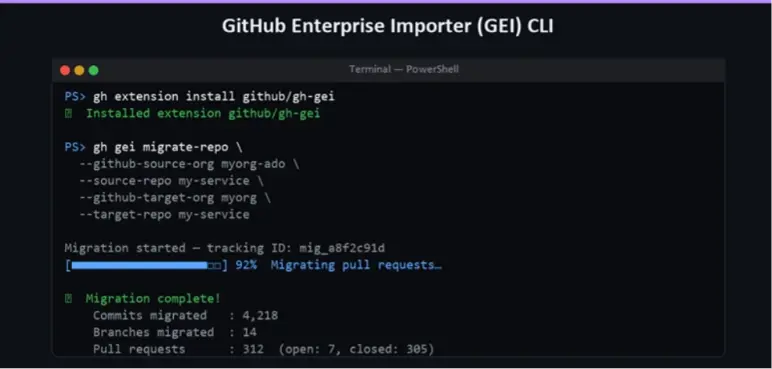
Command line output showing GitHub Enterprise Importer (GEI) CLI installing an extension and migrating repository data with progress and completion statistics.
The GitHub Enterprise Importer (GEI)

Microsoft and GitHub provide tooling to support the migration process. 

The GitHub Enterprise Importer (GEI) is the official tool for migrating repositories from Azure DevOps to GitHub Enterprise. It is available as a CLI tool (gh-gei) and handles: 

  • Full Git history migration 
  • Pull request migration (titles, descriptions, comments, and state) 
  • Repository settings migration 

The GEI is the recommended approach for most migrations. It requires appropriate permissions on both the source (Azure DevOps) and the destination (GitHub Enterprise), and handles the authentication and API calls automatically.

To install the GEI extension: 

gh extension install github/gh-gei 

To migrate a single repository: 

gh gei migrate-repo \ 
  --github-target-org "my-org" \ 
  --target-repo "my-repo" \ 
  --ado-source-org "my-ado-org" \ 
  --ado-source-team-project "MyProject" \ 
  --ado-source-repo "MyRepo" 

For large organisations with many repositories, the GEI supports bulk migration using a generated migration script, allowing you to queue and execute dozens or hundreds of migrations in sequence. 

git-tfs for TFVC Migration 

If you have repositories still using TFVC, you will need to convert them to Git before migrating. The git-tfs tool is the most widely used approach. It reads the TFVC history and replays it as Git commits, giving you a proper Git repository with full history that can then be imported into GitHub. 

Alternatively, Azure DevOps itself offers an "Import Repository" feature that can convert a TFVC project to a Git repository within Azure DevOps first, after which you can use GEI as normal. 


Planning the Migration at Scale 

For organisations with tens or hundreds of repositories, a structured approach is essential. Recommended steps: 

  1. Audit your repositories: Run a script against the Azure DevOps API to enumerate all repositories, their sizes, last commit dates, and active contributors. This allows you to categorise repositories as active, archived, or candidates for deletion. 
  2. Define your GitHub organisation structure: Decide how your Azure DevOps team projects map to GitHub organisations and teams. A common approach is one GitHub organisation per Azure DevOps organisation, with GitHub Teams reflecting the team project structure. 
  3. Migrate in waves: Start with lower-risk repositories (internal tools, archived projects) to validate the process before migrating business-critical codebases. 
  4. Communicate a cutover plan: Agree on a cutover date for each repository. During migration, the Azure DevOps repository should be set to read-only to prevent commits from being lost. After validation, development resumes on GitHub. 
  5. Update integrations: Any service connection, webhook, or external tool pointing at the Azure DevOps repository URL will need updating. CI pipelines, deployment tools, and IDE configurations are the most common items to update. 


GitHub Repository Features Worth Adopting Immediately 
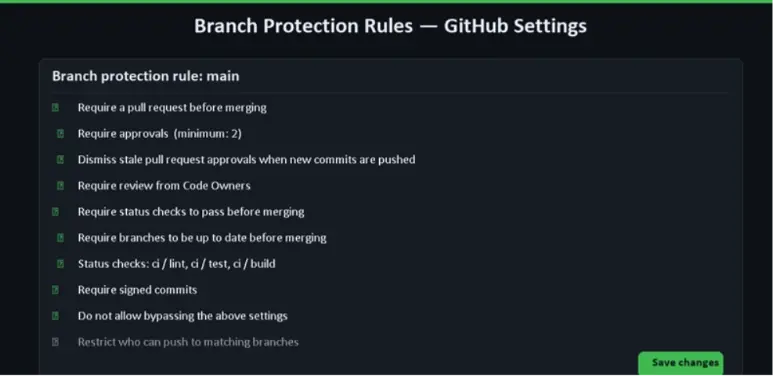
GitHub settings interface displaying branch protection rules for the 'main' branch, including pull request requirements and status checks.

Once repositories are on GitHub Enterprise, there are several features worth configuring immediately to maximise the value of the migration. 


Branch Protection Rules

GitHub's branch protection rules allow you to enforce quality and safety standards on key branches. For a typical main branch, you might configure: 

  • Require pull request reviews before merging (with a minimum reviewer count) 
  • Require status checks to pass (e.g., CI builds, test runs) 
  • Require branches to be up to date before merging 
  • Restrict who can push directly to the branch 
  • Require signed commits for auditability 
  • Block force pushes and deletions  

These rules can be defined in the GitHub UI or managed as code using Terraform with the GitHub provider, enabling consistent enforcement across all repositories.


Code Owners 

The CODEOWNERS file allows teams to declare ownership of specific directories or file types within a repository. When a pull request touches a file owned by a team or individual, GitHub automatically requests a review from that owner.

Example CODEOWNERS file: 

# Global owners - review all changes 
*       @my-org/platform-team 

# Frontend code 
/src/frontend/   @my-org/frontend-team  

# Infrastructure as code 
/infra/          @my-org/devops-team

This removes the manual step of remembering to add reviewers and ensures the right people are always involved in reviewing changes to sensitive parts of the codebase. 


Repository Templates 

For new projects going forward, GitHub repository templates allow you to pre-populate new repositories with: 

  • A standard directory structure 
  • Default GitHub Actions workflows 
  • A CODEOWNERS file 
  • Issue and pull request templates 
  • A CONTRIBUTING.md and README.md 
  • A default .gitignore and licence file 

This dramatically reduces the time to get a new project off the ground whilst ensuring it starts with the right foundations.


Issue and Pull Request Templates 

GitHub supports Markdown templates for issues and pull requests, ensuring contributors provide the right information when raising bugs, feature requests, or changes. These templates live in the .github/ directory of the repository and are surfaced automatically when users open a new issue or pull request. 


Validating the Migration 

Comparing commit counts and branch history between Azure DevOps and GitHub after migration 

After migrating each repository, it is good practice to validate the result before decommissioning the Azure DevOps source: 

  • Verify commit count: compare the total number of commits in the GitHub repository against the Azure DevOps source 
  • Verify branches and tags: check that all branches and tags are present 
  • Check pull request history: confirm that historical pull requests have been imported correctly 
  • Test a clone: clone the GitHub repository and verify the working tree matches the expected state 
  • Run the CI pipeline: trigger the migrated or newly configured GitHub Actions workflow to confirm the build passes 


Post-Migration Housekeeping 

Once repositories are live on GitHub Enterprise: 

  • Archive or delete the Azure DevOps repositories to avoid confusion (set them to read-only first) 
  • Update any documentation, runbooks, or onboarding guides that reference Azure DevOps URLs 
  • Update local developer environments - developers will need to update their Git remote URLs (git remote set-url origin <new-github-url>) 
  • Revoke Azure DevOps personal access tokens (PATs) that are no longer needed 


Conclusion 

Migrating repositories from Azure DevOps to GitHub Enterprise is a well-supported process with mature tooling and clear best practices. By using the GitHub Enterprise Importer, planning your migration in waves, and adopting GitHub's repository features from day one, you can complete the move with minimal disruption while immediately delivering a better experience for your development teams. 

The next article in this series looks at the other major component of the migration: transforming Azure Pipelines into GitHub Actions workflows. 

Marc Bosgoed

Ready to move from Azure DevOps to GitHub?

Adopt GitHub through a hybrid approach or full migration, with minimal disruption, built-in security and clear governance.

Learn more about the migrating to GitHub