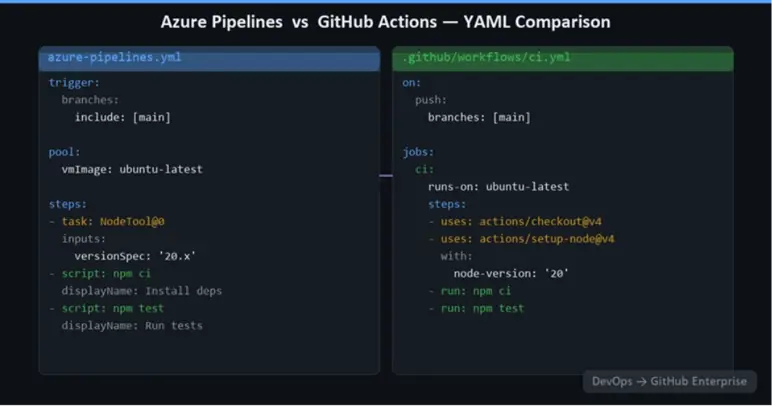
Anatomy of a GitHub Actions Workflow
name: Build and Test

on:
  push:
    branches: [main]
  pull_request:
    branches: [main]

jobs:
  build:
    runs-on: ubuntu-latest

    steps:
      - name: Checkout code
        uses: actions/checkout@v4

       - name: Set up .NET
        uses: actions/setup-dotnet@v4
        with:
          dotnet-version: '8.x'

       - name: Restore dependencies
        run: dotnet restore

      - name: Build
        run: dotnet build --no-restore --configuration Release

      - name: Test
        run: dotnet test --no-build --configuration Release
This is the equivalent of a basic Azure Pipelines YAML build. The structure is clean and readable, and the actions used (actions/checkout, actions/setup-dotnet) are officially maintained by GitHub and Microsoft, respectively.
Mapping Azure Pipelines Concepts to GitHub Actions
Variables and Secrets
In Azure Pipelines, variables are defined inline, in variable groups, or passed from the UI at queue time. In GitHub Actions:
- Workflow-level variables are defined under
env: at the workflow or job level
- Secrets are stored in GitHub Secrets (repository, environment, or organisation scope) and accessed via
${{ secrets.MY_SECRET }}
- Variables (non-secret) can also be stored in GitHub Variables and accessed via
${{ vars.MY_VAR }}
jobs:
  deploy:
    runs-on: ubuntu-latest
    env:
      ENVIRONMENT: production
    steps:
      - name: Deploy
        run: ./deploy.sh
        env:
          API_KEY: ${{ secrets.API_KEY }}
Environments and Approval Gates
Azure Pipelines supports pre-deployment approval gates on stages. GitHub Actions has an equivalent concept through Environments. You create a named environment (e.g., production) and configure required reviewers. When a job targets that environment, it pauses and waits for approval before proceeding.
jobs:
  deploy-prod:
    runs-on: ubuntu-latest
    environment: production
    steps:
      - name: Deploy to production
        run: ./deploy-prod.sh
        env:
          AZURE_CREDENTIALS: ${{ secrets.AZURE_CREDENTIALS }}
Reusable Workflows
Azure Pipelines templates allow you to define reusable pipeline fragments. GitHub Actions has reusable workflows - entire workflow files that can be called from other workflows using workflow_call.
A reusable workflow (.github/workflows/deploy.yml):
on:
  workflow_call:
    inputs:
      environment:
        required: true
        type: string
    secrets:
      AZURE_CREDENTIALS:
        required: true

jobs:
  deploy:
    runs-on: ubuntu-latest
    environment: ${{ inputs.environment }}
    steps:
      - uses: actions/checkout@v4
      - name: Deploy
        uses: azure/webapps-deploy@v3
        with:
          app-name: my-app-${{ inputs.environment }}
          publish-profile: ${{ secrets.AZURE_CREDENTIALS }}
Calling the reusable workflow:
jobs:
  call-deploy:
    uses: my-org/my-repo/.github/workflows/deploy.yml@main
    with:
      environment: staging
    secrets:
      AZURE_CREDENTIALS: ${{ secrets.AZURE_CREDENTIALS }}
This pattern is equivalent to Azure Pipelines templates and enables DRY, maintainable pipeline code across an organisation.
Deploying to Azure from GitHub Actions
GitHub Actions has excellent support for deploying to Azure, with a full suite of officially maintained actions:
azure/login@v2 — authenticates to Azure using a service principal or OIDC (recommended). azure/webapps-deploy@v3 — deploys to Azure App Service. azure/container-apps-deploy-action@v2 — deploys to Azure Container Apps. - azure/aks-set-context@v4 — connects to an AKS cluster.
azure/arm-deploy@v1 — deploys ARM/Bicep templates.
The recommended authentication approach is OIDC (OpenID Connect) — this eliminates the need to store long-lived service principal secrets in GitHub Secrets. Instead, Azure is configured to trust GitHub's identity provider, and short-lived tokens are issued at runtime.
- name: Azure Login (OIDC)
  uses: azure/login@v2
  with:
    client-id: ${{ secrets.AZURE_CLIENT_ID }}
    tenant-id: ${{ secrets.AZURE_TENANT_ID }}
    subscription-id: ${{ secrets.AZURE_SUBSCRIPTION_ID }}
No client secret is required — the trust is established through federated identity credentials configured on the Azure service principal.
Self-Hosted Runners
if your pipelines need to run in a private network (to access on-premises databases, internal APIs, or private Azure resources), GitHub Actions supports self-hosted runners. These are equivalent to Azure Pipelines self-hosted agents.
- Self-hosted runners can be: Individual VMs registered to a repository, organisation, or enterprise.
- Containerised runners using Actions Runner Controller (ARC) on Kubernetes — the recommended approach for scalable, ephemeral runners.
Runner groups in GitHub Enterprise allow you to control which organisations and repositories can use specific runner pools, providing the same governance model as Azure Pipelines agent pool permissions.
Handling Release Stages and Multi-Environment Deployments
A common Azure Pipelines pattern is multi-stage pipelines: build → deploy to dev → deploy to staging (with approval) → deploy to production (with approval). In GitHub Actions, this maps to:
- A build job that produces an artifact.
- Deployment jobs that depend on the build job (
needs: build) and target specific environments.
- Environment protection rules (required reviewers) providing the approval gate.
jobs:
  build:
    runs-on: ubuntu-latest
    steps: [ ... ]
    outputs:
      image-tag: ${{ steps.build.outputs.tag }}

   deploy-dev:
    needs: build
    environment: development
    runs-on: ubuntu-latest
    steps: [ ... ]

   deploy-staging:
    needs: deploy-dev
    environment: staging
    runs-on: ubuntu-latest
    steps: [ ... ]

  deploy-prod:
    needs: deploy-staging
    environment: production
    runs-on: ubuntu-latest
    steps: [ ... ]
Tips for a Smooth Migration
- Migrate incrementally: start with a new workflow running in parallel with the existing Azure Pipeline before cutting over.
- Use the GitHub Actions marketplace: for the most common tasks (building Docker images, running tests, deploying to cloud services), there is a maintained action available.
- Centralise reusable workflows in a dedicated
.github repository at the organisation level, making them available to all repos.
- Use composite actions for sharing steps within a repository without the overhead of a full reusable workflow.
- Audit your Azure DevOps service connections: each one likely needs to become a GitHub Secret or an OIDC federated credential.
Closing thoughts
Migrating from Azure Pipelines to GitHub Actions requires more thought than a simple lift-and-shift, but the result is a cleaner, more maintainable, and more powerful CI/CD platform. GitHub Actions' event-driven model, the marketplace's richness, and its tight integration with GitHub repositories make it a significant upgrade for most teams.
The next article takes a deeper look at one of the most compelling reasons to move to GitHub Enterprise: the Advanced Security capabilities that are built directly into the platform.