Benefits of Infrastructure-as-a-Service
- Lower upfront cost: Replace hardware purchases with pay-as-you-go spending.
- Elastic scaling: Scale compute, storage, and networking up/down quickly to match demand.
- Fast provisioning: Spin up servers and environments in minutes instead of weeks.
- High control: Choose OS, middleware, networking, and configurations to fit exact needs.
- Lift-and-shift friendly: Move existing/legacy workloads with minimal code changes.
- Improved resiliency options: Use regions/zones and redundancy features for higher uptime.
- Disaster recovery readiness: Easier backups/replication and recovery across locations.
- Operational flexibility: Standardise and automate infrastructure with IaC and scripting.
- Security foundations: Cloud provider-grade physical/security controls plus your own configuration.
Azure IaaS examples
Use IaaS when you genuinely need deep control, or when you need to move quickly without rewriting everything.
Typical Azure IaaS patterns:
- Lift and shift: Moving VMs from on-prem into Azure to get out of the data centre fast. Azure Migrate supports assessment for this kind of approach.
- Legacy constraints: Older apps that need specific OS settings, drivers, or non-standard runtime behaviour.
- Troubleshooting access: Sometimes you need to gain access to the OS, check event logs, inspect certificates, or explore the file system.
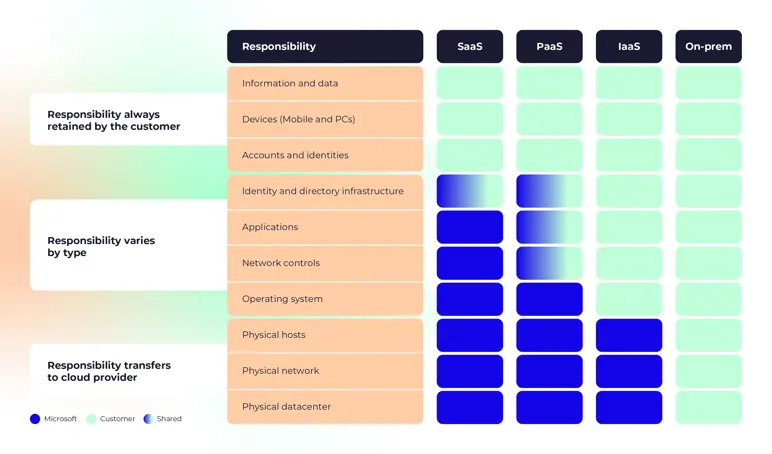
IaaS gives you the most control and the most responsibility: patching, configuration, availability, backups, and disaster recovery.
Real-world IaaS scenarios
Common scenarios when IaaS is used are:
- Lift-and-shift scenarios: Customers want public cloud benefits but aren’t ready to modernise. Tools like Azure Migrate help assess and right-size.
- Testing and development: Use IaaS when you need dev and test environments you can spin up and tear down fast, with full control over the OS and configuration. Handy when environments must match production closely or need custom settings.
What is PaaS?
Platform as a Service (PaaS) provides a managed platform for running your app, eliminating the need to manage the underlying servers. You usually keep control over your application, data, and configuration, while Microsoft handles more of the “under the hood” platform work.
Benefits of PaaS
- Faster time-to-market: Use ready-made runtimes, services, and APIs instead of building platform plumbing.
- Higher developer productivity: Teams focus on code, not OS, patching, or platform maintenance.
- Built-in scaling: Scale apps with platform features rather than custom infrastructure designs.
- Reduced ops burden: Provider handles patching, updates, and much of the runtime management.
- Cost efficiency at scale: Lower operational overhead and better utilisation than self-managed stacks.
Azure PaaS examples
PaaS shines when you want to spend less time on platform upkeep and more time on features.
Common choices:
- Azure App Service for hosting web apps and APIs.
- Azure SQL Database for a managed database where backups and platform operations are handled for you. Automated backup retention varies and can be configured, with retention ranges documented by Microsoft.
Some compare a single VM to a PaaS service and conclude PaaS is “more expensive”. That comparison usually ignores what you had to build around the VM (availability, load balancing, patching, scaling, monitoring, backup processes). The numbers might appear higher on a cloud invoice, but the actual cost is lower because your team spends less time managing the platform.
Azure SQL is a great example. One database may cost more than running SQL on a VM, but you get features like elastic pools, automated backups, and platform resiliency; things you can’t easily replicate on-prem.
Real-world scenarios
Some common scenarios where PaaS might make sense include:
- Development framework: Use PaaS when you require a pre-built platform for developing and running applications. You focus on the code. Azure handles the scaling, availability, and multi-tenancy basics so you write less “infrastructure” logic.
- Analytics or business intelligence: Use PaaS when you need managed analytics tools to turn data into insights. Less time standing up servers. More time answering forecasting, product, and performance questions.
What is SaaS?
Software as a Service (SaaS) is the finished product. You sign in and use it. Updates, availability, and the core service operation are handled by the provider. Your focus is identity, access, data, and how you use the software. Microsoft 365 is the obvious example.
SaaS is often defined by the experience (browser login, subscription model, features delivered continuously), not by what is running behind the scenes.
Benefits of SaaS
- Fast time-to-value: Sign up and start using the app immediately; no deployment required.
- Predictable subscription costs: Shift from CapEx to OpEx with clear per-user/per-feature pricing.
- Low IT overhead: No server management, installs, patching, or upgrade projects for your team.
- Automatic updates: Provider rolls out features and security updates continuously.
- Anywhere access: Use from any location/device with internet, often via browser/mobile.
- Easy scaling: Add/remove users and features quickly as needs change.
- Collaboration built-in: Shared workspaces, real-time editing, and integrated workflows are common.
SaaS examples
Examples of SaaS solutions:
- Microsoft 365 / SharePoint style services, where you log in and use the product.
- Many business tools you buy per user, per month.
SaaS is also where people can get complacent. You might have “no control whatsoever” over the service internals, yet you still control user access and how data is handled. Ignore that, and SaaS also becomes quite risky.
Real-world scenarios
Common scenarios for SaaS include:
- Business productivity applications.
- Email and messaging.
- Finance and expense tracking.
What is Serverless on Azure?
Serverless often sits between PaaS and “pure code”. It deserves its own call-out because it changes the cost model and the architecture style. Serverless is where you push your code and the platform handles provisioning and scaling.
Microsoft describes serverless computing as: “Serverless is event-driven, with the cloud platform provisioning and scaling infrastructure for you.”
- You write code to the platform’s constructs.
- You pay for execution, not for idle servers.
- You accept tighter coupling to the platform, which is a form of vendor lock-in.
Benefits of serverless
- Pay for execution only: No cost for idle time; billing aligns to actual runtime and usage.
- Automatic scaling: Scales instantly with events and traffic without capacity planning.
- Rapid delivery: Deploy small units of functionality quickly with minimal infrastructure setup.
- Minimal maintenance: Provider manages servers, patching, and runtime availability.
- Event-driven fit: Ideal for triggers like file uploads, messages, timers, and webhooks.
- Fine-grained architecture: Break logic into small functions that are easier to iterate and observe.
- High availability by design: Built-in fault tolerance is typically part of the platform.
- Efficient for spiky workloads: Particularly cost-effective when workloads are intermittent or unpredictable.
Azure serverless examples
- Azure Functions: run code on triggers (HTTP, timers, queues, events).
- Logic Apps: workflow automation and integration.