Blog Azure Data & AI

Azure AI Security Best Practices

AI can help teams build faster, but speed without guardrails creates risk. 

Without proper controls, that speed can backfire, as AI can introduce insecure configurations, outdated code, hallucinated commands, and workflows that are difficult to review or audit.

This article outlines the Azure AI security best practices that help teams adopt AI securely in production. 

Niels Kroeze

Author

Niels Kroeze Cloud Content Specialist

Reading time 7 minutes Published: 10 August 2026

The importance of security with AI 

Security should always be a top priority in application development. With AI-enabled applications, it becomes even more important. The rapid deployment of AI is outpacing security and compliance controls, increasing business risks. 

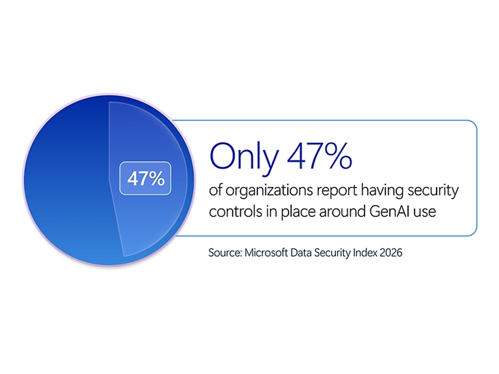
According to Microsoft’s Cyber Pulse report, only 47% of organisations report implementing specific GenAI security controls. AI is scaling faster than the security around it.

In Azure, those risks often appear when AI services are deployed without proper identity-based access, network restrictions, or logging. Default publishing methods are not enough for production. Azure AI workloads need fine-grained identity controls, such as Microsoft Entra ID. 


Azure AI Security Best Practice

Let's examine the fundamental Azure AI security best practices that Microsoft adheres to and recommends its users follow:

1. Adopt Zero Trust

Zero Trust is the foundation for securing Azure AI workloads. Don’t assume that an application, user, service, or agent can be trusted by default. Every request should be authenticated, authorised, and continuously evaluated. Use Microsoft Entra ID, Azure RBAC to control access and least privilege: give every user, AI agent, or system only what they need—no more.

Applications should use managed identities instead of embedded secrets. Agentic workflows should use dedicated identities, such as Entra Agent IDs, where relevant. If a user’s identity is part of the AI workflow, carry that identity through the process so data-level security still applies.

Where possible, assign permissions through security groups rather than directly to service principals. It keeps access easier to manage and reduces the chance of misconfiguration.


2. Avoid embedded secrets and shared credentials

API keys can be copied, leaked, stored in the wrong place, or reused across multiple applications. Developers may accidentally store them in local files, notes, app settings, public repositories, or shared documents. They can be passed around internally without proper control

Where possible, developers should avoid embedding secrets or using shared credentials in code.

  • Use managed identities for Azure-hosted applications and Microsoft Entra ID for authentication.
  • For agentic workflows, use dedicated identities, such as Entra Agent IDs where relevant, instead of shared service principals. Each workload should have its own clear boundary.


3. Centralise secrets with Azure Key Vault

Don’t store secrets across app settings, configuration files, or deployment notes. When secrets are still required, store them centrally and reference them securely from applications.

  • Use Azure Key Vault as the central place to store secrets, keys, and certificates. Instead of storing an Azure OpenAI key directly in every web application, the application can reference the secret from Key Vault. This improves security and operations by centralising secret management, allowing applications to store the actual values indirectly and making rotation easier.
  • Access can also be controlled with Microsoft Entra ID and Azure RBAC, with auditing and access logs in a single place.


4. Secure AI Development Lifecycle

Security should start before deployment and continue until after deployment. It needs to be part of how teams design, build, review, and release with AI. AI-generated cloud infrastructure requires security reviews before deployment, as its output shouldn’t be blindly trusted. It may deploy successfully and still be insecure, for example, by using outdated packages, weak settings, or exposed network rules.

  • Build security checks into every stage of development, including testing and validation.
  • Use shift-left tools such as static code analysis, secret scanning, dependency checks, and automated vulnerability scanning in CI/CD. GitHub Advanced Security can help detect secrets, vulnerabilities, and dependency issues before they reach production.
  • Use Microsoft Defender for Cloud and Defender for App Services for runtime protection: these tools help you detect threats, enforce policies, and improve visibility once workloads are running. 

The most effective approach combines tooling with collaboration.


5. Human-in-the-Loop

AI can suggest fixes, generate pull requests, update infrastructure, or help remediate vulnerabilities. But those changes can still be wrong, incomplete, or risky. An AI-generated fix or an AI agent can solve one problem while creating another (think of a new security vulnerability).

“With anything you do with AI, you can't just trust what it's gonna deliver. You need a basic understanding of what it's giving you. Otherwise, you're just gonna deploy it and end up with your any-any role. You know, if you don't understand Azure, networking, or even Bicep to a basic level, you're gonna get mistakes, security issues, vulnerabilities, and bad code.”

Richard Hooper, Azure Principal Architect and Microsoft MVP

AI governance means knowing exactly where human oversight is needed and building it into the workflow rather than adding it after deployment.

Embedding an Azure infrastructure or security expert within the development team helps ensure secure deployment configurations and supports developers in delivering secure, scalable AI services from day one. Developers can focus on application development, while Azure infrastructure specialists manage the areas they know best.


6. Publish AI services through secure endpoints

AI services should not be exposed through raw, unmonitored endpoints. In Azure, risks often arise when services such as Azure OpenAI or Azure AI Services are published without proper identity-based access controls, network restrictions, or logging.

Use secure front-door services such as:

  • Azure API Management
  • Azure Front Door
  • Application Gateway with Web Application Firewall protection

These services provide a controlled environment in which teams can apply authentication, traffic filtering, monitoring, and security policies.

Where it fits the architecture, use private endpoints or virtual network integration to reduce direct internet exposure. Developers should also disable local authentication where possible and enforce Entra-based authentication.

The goal is to prevent alternative “side door” access routes and keep access to AI services controlled, monitored, and intentional.


7. Implement AI-specific threat protection

AI workloads face specific risks, including:

  • Prompt injection
  • Jailbreak attempts
  • Model manipulation
  • Sensitive data exposure
  • Unusual API usage

Use Microsoft Defender for Cloud AI threat protection to detect AI-specific threats. This can help identify suspicious prompts, anomalous usage patterns, and possible data exposure risks.

Where possible, integrate these checks into CI/CD pipelines. That way, AI security testing becomes part of the release process, rather than a one-off review after deployment.


8. Monitor, audit, and review continuously

You can’t secure what you can’t see. Teams need visibility into which AI applications and agents are in use, who owns them, what data they access, and how they behave.

Microsoft offers various built-in tools and technologies that provide insight into how the system is performing, identify security weaknesses, and flag suspicious activity.

  • Use Microsoft Defender for Cloud to discover AI workloads in Azure and identify security risks.
  • For SaaS AI applications, Microsoft Defender for Cloud Apps can help assess, sanction, or block tools, reducing shadow AI across the organisation.
  • Agentic workflows need the same visibility. Microsoft Entra Agent ID can help manage agent identities and their lifecycles, making permissions easier to control.

Observability makes the real difference for safe and secure agents.


9. Protect sensitive data in AI interactions

AI security relies on data privacy, especially in sensitive sectors such as healthcare and finance.

AI may interact with sensitive data through prompts, responses, connected data sources, or application workflows. Without the right controls, teams risk oversharing data or exposing information to tools that shouldn’t have access.

  • Use Microsoft Purview Data Security Posture Management for AI to understand AI activity, assess data risk, and apply policies that help protect sensitive data in AI interactions. Microsoft Purview includes controls for managing risks across Copilots, agents, and other generative AI applications.
  • Extend existing data protection controls to AI workloads. This includes applying sensitivity labels, using DLP policies, and monitoring where sensitive information appears in prompts, responses, and connected applications.

Sensitive data shouldn’t appear in prompts, responses, or workflows where it doesn’t belong. Use policies to restrict oversharing and keep data access aligned with the workload.


Closing thoughts

Protecting AI workloads is crucial for keeping sensitive data secure, maintaining customer trust, and reducing the risk of misconfigurations reaching production.

By following Azure AI security best practices, such as adopting a Zero Trust model, centralising secrets, reviewing AI-generated output, and continuously monitoring workloads, organisations can take their first steps towards adopting AI with greater control and confidence.

No matter how quickly AI moves, security shouldn’t fall behind. Only with the right guardrails in place can teams adopt AI securely in Azure without losing visibility over access, data, and production changes.

Marc Bosgoed

Want to start securely with AI in Azure? 

Our experts will help to implement governance measures to ensure the AI solution is secure and compliant, giving you complete confidence in managing and running AI projects safely. 

​​AI Accelerator​