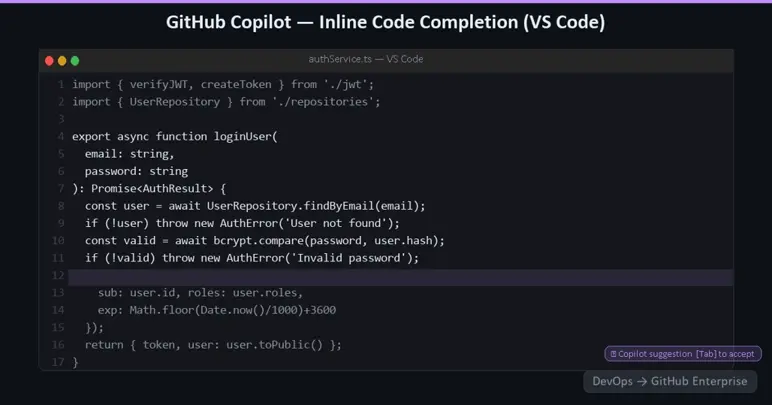
GitHub Copilot Chat
Copilot Chat is a conversational AI interface embedded in the IDE and on GitHub.com. It allows developers to:
-
Ask questions about the codebase in natural language: "What does this function return if the input is null?"
-
Request explanations of code they did not write: "Explain what this regex matches"
-
Get help debugging: "Why is this test failing? Here is the error output"
-
Ask for refactoring suggestions: "Rewrite this method to use async/await instead of callbacks"
-
Generate code from a description: "Write a GitHub Actions workflow that builds a Docker image and pushes it to GitHub Container Registry"
In the IDE, Copilot Chat has access to the full workspace, the open editor, the terminal, test results, and the broader file tree. On GitHub.com, it has access to the repository being viewed and can be scoped to specific files, pull requests, issues, or discussions.
GitHub Copilot for Pull Requests
Copilot integrates directly into the GitHub pull request review process in several ways:
- Copilot Code Review: when a developer opens a pull request, they can request a Copilot code review. Copilot analyses the diff and produces inline comments identifying potential issues, suggesting improvements, and flagging code that does not follow established patterns in the codebase. These comments are indistinguishable from human reviewer comments and can be accepted with a single click.
- Pull Request Summaries: Copilot can automatically generate a summary of what a pull request does, what files it touches, and what the reviewer should pay particular attention to. This dramatically reduces the cognitive load of reviewing large pull requests and is especially valuable when the author and reviewer are in different time zones.
- Suggested Changes: Copilot can generate code suggestions as part of its review that the pull request author can accept, reject, or modify directly in the GitHub UI.
GitHub Copilot in GitHub.com
Beyond the IDE and pull requests, Copilot is embedded throughout GitHub.com:
- Issues and Discussions: Copilot can suggest relevant issues, summarise discussion threads, and help draft responses
- Repository search: natural language search across a repository: "Find all places where we throw unhandled exceptions in the payment service"
- GitHub Actions: Copilot can generate workflow files from a description of what the workflow should do
- Documentation generation: Copilot can generate or update documentation based on code changes
GitHub Copilot Extensions
The Copilot Extensions framework allows third parties to build integrations that surface within the Copilot Chat interface. This includes extensions for:
- Querying internal databases or APIs from within the chat
- Interacting with ticketing systems (e.g., asking Copilot to create a Jira issue based on a code finding)
- Accessing internal documentation or knowledge bases
- Running tests or deployments from within the chat interface
Extensions are available through the GitHub Marketplace and can be built internally using the GitHub Copilot Extensions API.
GitHub Copilot Workspace (Agentic Development)
Copilot Workspace represents the leading edge of GitHub's AI investment - an agentic development environment where Copilot does not just assist with individual lines or functions, but takes on entire tasks.
A developer describes a task - "Add pagination to the user’s endpoint in the API" and Copilot Workspace:
- Reads the relevant code and understands the existing patterns
- Proposes a plan: which files need to change and what each change will do
- Implements the changes across multiple files
- Writes or updates tests
- Proposes a pull request description
The developer reviews the plan before execution, can modify it, and retains full control over what is committed. This is not code generation in the traditional sense, it is task delegation. The developer specifies the outcome, and Copilot handles the implementation.
Technical Architecture: How GitHub Copilot Enterprise Works
Understanding the architecture of GitHub Copilot Enterprise is important for both security evaluation and effective deployment.
The Model
GitHub Copilot is powered by large language models from multiple providers, including models developed in partnership with OpenAI (GPT-4 family) and increasingly models from Anthropic and Google. In GitHub Copilot Enterprise, customers can select which model to use for different tasks, allowing optimisation for speed, cost, or capability.
Contextual Retrieval with Embeddings
The key differentiator for Copilot Enterprise over the individual tier is codebase-level context. GitHub indexes your organisation's repositories using embedding models and stores vector representations of code. When a developer makes a request whether for a completion, a chat response, or a pull request review - Copilot performs a semantic similarity search across the index to retrieve the most relevant code from your own codebase.
This means Copilot can understand:
- The authentication library your team uses and how you call it
- The naming conventions in your codebase (e.g., GetAsync vs FetchAsync)
- The patterns your team uses for error handling, logging, and configuration
- Internal APIs and their expected usage
This level of context produces suggestions that feel native to your codebase rather than generic programming advice.
Data Privacy and IP Controls
A common concern when evaluating Copilot for enterprise use is around data privacy. GitHub provides the following guarantees for Enterprise customers:
- No training on your code - prompts and code snippets sent to Copilot are not used to train future models for any customer
- Data retention controls - telemetry and usage data retention is configurable
- IP indemnification - GitHub offers intellectual property indemnification for Copilot Enterprise customers, covering legal exposure from generated code
In regulated industries, GitHub Enterprise Server (the self-hosted option) can be configured to route Copilot requests through a private endpoint, keeping all data on-premises or within a private cloud boundary.
Content Exclusions
Administrators can configure file paths and repositories that Copilot should not access or suggest content from. This is useful for:
- Excluding sensitive configuration files or secrets
- Preventing Copilot from suggesting code from repositories that are not yet fully security-reviewed
- Excluding legacy codebases with known security issues from being treated as reference patterns
Enterprise Administration and Policy Controls
GitHub Copilot Enterprise gives organisation administrators granular control over the rollout and usage of Copilot.
Enabling Copilot at the Organisation Level
Copilot is assigned on a per-seat basis. Organisation owners can assign Copilot accessto specific users, teams, or all members of the organisation. Access can be granted and revoked centrally without requiring action from the individual developer.
Policy Configuration
Administrators can configure policies for:
- Suggestions matching public code - whether Copilot should suppress suggestions that closely match publicly available code (to reduce licence risk)
- Copilot Chat in IDE - whether the conversational interface is available
- Copilot on GitHub.com - whether the web-based chat and PR features are enabled
- Copilot in the CLI - whether Copilot is available in the GitHub CLI (gh copilot)
These policies can be set at the enterprise level (applying to all organisations) or at the organisation level, with enterprise-level settings taking precedence.
Usage Metrics and Adoption Tracking
GitHub Enterprise provides usage metrics for Copilot at the organisation level, including:
- Number of active users and seats consumed
- Acceptance rate for code completions (the percentage of suggestions that developers accept vs dismiss)
- Lines of code accepted and retained (code that was accepted and not subsequently deleted)
- Breakdown by language and editor
These metrics are important for demonstrating ROI and for identifying teams or individuals who might benefit from additional onboarding or training.
Measuring the Impact: What the Research Shows
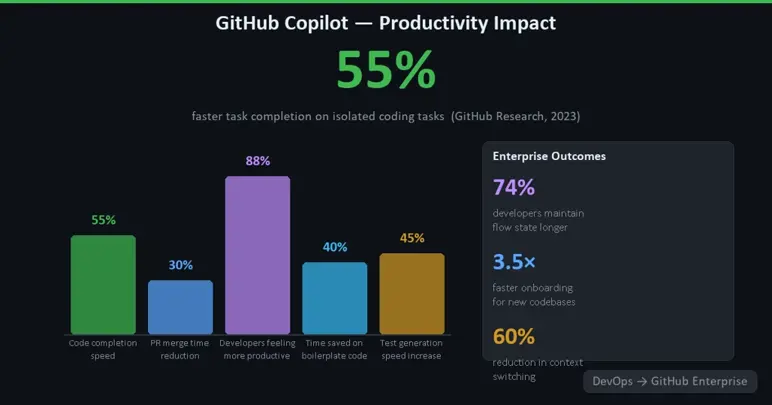
GitHub has published data from large-scale studies of Copilot usage that provide a basis for estimating the productivity impact for your organisation.
- Completion acceptance rate: across GitHub Enterprise customers, developers accept approximately 30% of Copilot's code suggestions. This acceptance rate varies by language and task type, with boilerplate-heavy tasks (configuration files, test scaffolding) seeing higher acceptance rates.
- Speed on isolated task: in controlled experiments, developers using Copilot completed identical coding tasks 55% faster than those without. The effect was most pronounced for:
- Writing code in an unfamiliar language or framework
- Writing unit tests
- Implementing algorithms from a description
- Cognitive load reduction: qualitative studies consistently show that developers report spending less mental energy on low-level syntax and boilerplate, leaving more capacity for higher-order problem-solving. This is measurable in self-reported flow states and reduced context-switching.
- PR cycle time: organisations using Copilot Code Review report reduced time-to-first-review and faster resolution of review feedback, since Copilot can provide an immediate first-pass review and developers can resolve many issues before a human reviewer sees the PR.
Rolling Out GitHub Copilot Across the Organisation
A successful enterprise rollout follows a deliberate path.
Phase 1: Champions and Early Adopters
Identify a cohort of enthusiastic developers, ideally across different teams and technology stacks and give them Copilot access first. Their feedback will surface the most common use cases, the most useful prompting techniques, and any integration issues specific to your toolchain.
Phase 2: Enablement and Training
Copilot's value scales with skill at prompting. Invest in enabling materials:
- Prompt engineering for developers - how to phrase requests to Copilot Chat to get better results
- IDE integration guides - keyboard shortcuts, inline chat invocation, how to scope suggestions to specific files
- Copilot for pull requests - how to use Copilot review and summaries effectively
- What Copilot is not good at - managing expectations around hallucinations, the importance of reviewing generated code, tasks where Copilot is less helpful (e.g., highly business-domain-specific logic without reference code in the codebase)
Phase 3: Broad Rollout with Policy Enforcement
Once the patterns are established, roll out to all developers with:
- Consistent policy configuration across the organisation
- Content exclusions in place for sensitive repositories
- Usage metrics collection to track adoption and impact
- A clear escalation path for questions about generated code quality or IP concerns
Phase 4: Agentic Workflows
As teams become comfortable with Copilot's capabilities, introduce the higher-level agentic features - Copilot Workspace for feature implementation, Copilot for automated refactoring, and Copilot Extensions for workflow integration. These require more trust and experience but deliver proportionally greater productivity gains.
GitHub Copilot vs Microsoft Copilot in Azure DevOps
It is worth directly addressing the question: does Azure DevOps offer anything comparable?
Microsoft has introduced Copilot features across its product suite, including some capabilities in Azure DevOps - work item summarisation, pipeline generation assistance, and limited PR description generation. However, these are surface-level integrations that do not approach the depth of GitHub Copilot.
The fundamental difference is that GitHub Copilot has been developed as a deep, native part of the GitHub platform since 2021. Every aspect of the product completions, chat, PR review, workspace, extensions is built with the developer workflow in mind and improves with each iteration. The Azure DevOps Copilot integrations are additions to a platform whose core architecture was not designed for them.
For organisations evaluating the migration and asking where the AI capability sits, the answer is clear: GitHub Enterprise, not Azure DevOps, is where Microsoft's AI investment in developer tooling is concentrated.
Conclusion: The Case Is Complete
This series has built the case for moving from Azure DevOps to GitHub Enterprise layer by layer:
- Article 1 established why the platform shift makes strategic sense
- Article 2 showed how repositories and their full history can be migrated cleanly using purpose-built tooling
- Article 3 detailed how Azure Pipelines workflows map to GitHub Actions, with a richer event model and a deeper marketplace
- Article 4 demonstrated how GitHub Advanced Security embeds security at the point of code authorship - a generational improvement over bolt-on scanning tools
- Article 5 (this article) has made the case that GitHub Copilot represents a genuinely transformative capability in AI-assisted development that has no meaningful equivalent in Azure DevOps
The aggregate of these advantages a better developer experience, stronger security posture, more maintainable CI/CD, and AI assistance embedded throughout the workflow represents a compelling reason to make the move. GitHub Enterprise is where modern software development is happening, and organisations that align with that platform position themselves to write better software, faster, and more securely.
The migration is well-supported, the ROI is measurable, and the cost of delay is real: every month spent on Azure DevOps is a month where your engineering organisation is not benefiting from the capabilities that GitHub Enterprise offers today and the pace of innovation means the gap will only widen.